Posts

Showing posts with the label Excel

Wistify.app

Image
Introduction Wistify.app is a mobile application developed by My Pharmacist House and its team. It allows users to seamlessly convert existing spreadsheets into functional mobile applications without writing any code. Currently, it offers three layout options: a searchable list, a quiz, and a decision flow. NOTE: On iOS, created apps can be accessed either directly as Progressive Web Apps (PWAs) via Safari or viewed within the official Wistify reader on App Store. Features Wistify. app follows a freemium model that includes a permanently free plan with basic, accessible features. The Free Basic package includes a limit of 3 published apps, a maximum of 1,800 data rows, and 1 GB of monthly storage. Upgrades are available when your application requires more capacity. Key features include Automatic database update notifications. Basic password protection for privacy. Notice board integration. File manager upload images and PDFs. Limitations Wistify exclusively supports CSV (comma-de...

RxCalc

Introduction During my time as a provisionally registered pharmacist rotating through Therapeutic Drug Monitoring (TDM), I realized that pharmacokinetic calculations were highly repetitive tasks. While pharmacokinetic modeling is useful, clinical decisions to withhold or adjust narrow therapeutic index drugs ultimately rely on the patient's clinical response. For instance, we monitor CRP, temperature, and white blood cell count for vancomycin and gentamicin, while actively tracking creatinine clearance changes for signs of toxicity. Mathematically, simply looking at a measured drug level often allows us to easily decide whether to withhold, adjust, or continue the current dose. This frequently renders subsequent pharmacokinetic calculations redundant. Consequently, I concluded that these calculations are primarily beneficial for dosage adjustments in toxicity cases. To streamline this process, I created an Excel-based TDM calculator in Excel sheet and OpenAsApp Link . The spreadsh...

Open As App

Image
Introduction Open As App is a no-code paltform that lets people turn calculations, lists and forms in a spreadsheet into mobile and web apps. To create a functional calculator app, you have to be familiar with Microsoft Excel . A detailed step-by-step on app creation guide is available here . Strengths Make mobile application creation more accessible. Check for update feature - Users can always manually click "Check For Updates" to sync the latest database changes. Pop up notification of new database will appear if a new Excel file is uploaded to the Open As App Cloud. Ability to change source file storage from Open As App Cloud to One Drive, Dropbox or Google Sheet. To do this, navigate to "Update data source" and click "Edit URL" However, when the source file is synced to an online Google Sheet, database updates do not trigger automatic notifications. Calculator app using Excel formulas can be designed easily. This is not feasible in AppSheet , Mdic...

Excel Tricks

Image
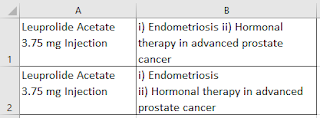
Introduction At times, some works (especially statistics reporting) are not difficult, but just too tedious to do it. Hence, we hope all report things can be auto-calculated with each new data entry. Here are some useful Microsoft Excel tricks that you should learn up to make it not a mission impossible. Ctrl + Shift to Select To quickly select a dataset, you can click in the first cell that you want to use and hold down Ctrl+Shift , then hit Down arrow or Up arrow to get all the data below or above in the column. Left arrow or Right arrow to get the data in the row (to the left or right respectively). Separate Line within a Cell and Wrap Text In Microsoft Excel , pressing ALT+Enter creates a new line within a cell. This just to make the data to be presented in a neater manner. An example is as below. Wrap Text Option under the Home tab automatically resize the row or column so that the text re-wraps to fit. Use AutoFilter The AutoFilter feature is such a useful feature when de...